CGM Price in Pakistan

Sinocare iCan i3 CGM with Ai App
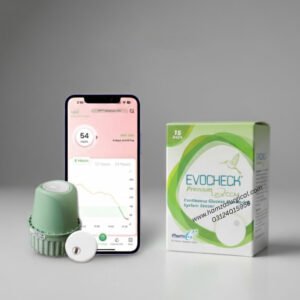
Evocheck GX-01S LinX Premium CGM
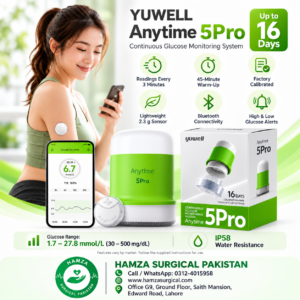

Yuwell Anytime 5Pro Continuous Glucose Monitoring System CGM – 16-Days Sensor
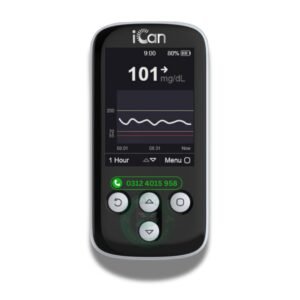

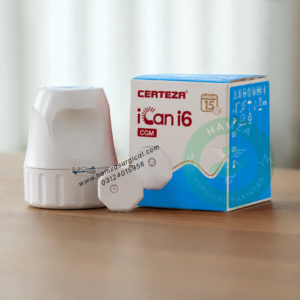


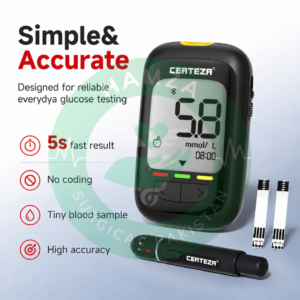
Certeza GL-110 Pro Glucometer with Bluetooth (Compatible with iCan App for iCan i6 Calibration)
A continuous glucose monitor uses a wearable sensor to track glucose throughout the day and night. For buyers in Pakistan, choosing a CGM involves more than the initial price: check the cost of replacement sensors, compatibility with your phone or reader, and suitability for the person who will wear it.
Hamza Surgical lists individual sensors, multi-sensor packages and related monitoring devices. Compare these separately—a reader, smartwatch or finger-prick glucose meter does not replace a CGM sensor.
CGM Sensors and Prices in Pakistan
Products with numeric prices are arranged by their lowest listed selling price. Package ranges reflect different quantities, rather than the cost of one sensor.
| No. | Product | Maximum sensor wear | Listed price |
|---|---|---|---|
| 1 | Sinocare iCan i3 CGM with AI App | Up to 15 days per sensor | Rs. 11,500–60,000 |
| 2 | Evocheck GX-01S LinX Premium CGM | Up to 15 days per sensor | Rs. 12,500–46,000 |
| 3 | Yuwell Anytime 5Pro CGM — 16-Day Sensor | Up to 16 days | Rs. 12,500 |
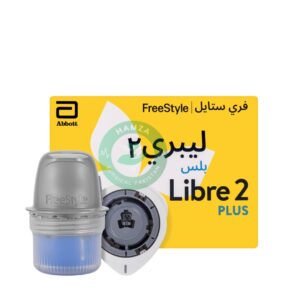
| 4 | FreeStyle Libre 2 Plus Sensor | Up to 15 days | Rs. 18,900 |
| 5 | Certeza iCan i6 CGM Sensor | Up to 15 days | Not listed |
The iCan i3 price range covers its selectable package options. Choose the required option on its product page before adding it to your cart.
Listed prices may change. Confirm price, availability, package contents and compatibility before placing an order. Maximum wear duration is the intended session length, not a guarantee that every sensor will complete that period.
Evocheck LinX GX-01S Package Options
| No. | Package | Listed selling price |
|---|---|---|
| 1 | One sensor | Rs. 12,500 |
| 2 | Pack of 2 sensors | Rs. 24,500 |
| 3 | Pack of 3 sensors | Rs. 36,000 |
| 4 | Pack of 4 sensors | Rs. 46,000 |
Which CGM Fits Your Monitoring Routine?
Sinocare iCan i3: Phone-Based Monitoring with Package Options
The iCan i3 provides glucose updates every three minutes and supports configurable high- and low-glucose alerts. Sinocare specifies a two-hour warm-up period before monitoring begins. Its app also provides glucose trends and reports.
This model offers selectable packages for different purchasing needs. Before choosing a larger package, confirm that the system works with your phone and fits your monitoring routine.
The i3 system uses a sensor and a matching transmitter. Because a purchase option is labelled “One Sensor Only,” confirm that the selected package contains the matching components required for a complete session.
Evocheck LinX GX-01S: A Small Sensor with a One-Hour Warm-Up
MicroTech specifies a 22 mm diameter, 2.16 g weight and one-hour warm-up for the GX-01S. The LinX system supports real-time glucose viewing and data sharing. These are practical considerations when comparing sensor size and setup time.
Check the exact GX-01S model when comparing specifications. Features published for other LinX models should not automatically be applied to it.
Yuwell Anytime 5Pro: A Longer Sensor Session
The Anytime 5Pro offers up to 16 days of wear, with glucose updates every three minutes and no routine user calibration, according to Yuwell’s authorised Australian distributor.
At the listed single-sensor prices, this gives a slightly lower calculated cost per wear day than the 15-day LinX option. However, phone compatibility, supported features and suitability for the wearer remain more important than one additional day of use.
FreeStyle Libre 2 Plus: Check How You Will View Readings
Libre 2 Plus supports compatible FreeStyle LibreLink smartphones and the Libre 2 reader in the markets described by Abbott. The supplied sensor’s regional version matters.
Abbott’s UK guidance explains that starting a sensor with a Libre 2 reader changes how readings are accessed: scanning is required, and alarms are received on the device used to start the sensor. Confirm your intended phone or reader setup before activation.
Certeza iCan i6: Sensor and Display Options
The Certeza listing identifies the iCan i6 model. Sinocare’s i6 documentation specifies a sensor weighing approximately 2 g, glucose updates every three minutes, and viewing through the iCan app or iCan view reader.
Check the supplied components and supported display devices together. Do not assume that a reader or watch is included with the sensor.
Related Devices
These items serve different purposes and are listed separately from CGM sensors.
| No. | Product | Purpose | Listed price |
|---|---|---|---|
| 1 | Certeza iCan Reader & Remote for iCan i6 CGM | Separate reading or monitoring device listed for the iCan i6 system | Not listed |
| 2 | Certeza GL-110 Pro Glucometer with Bluetooth | Finger-prick blood glucose meter | Not listed |
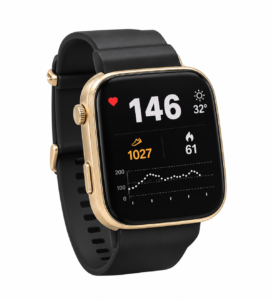
| 3 | Certeza Smart Watch for iCan i6 CGM | Watch accessory listed for the iCan i6 system | Not listed |
Readers and watches do not replace the wearable sensor. Check the exact supported sensor, app and phone requirements before selecting an accessory. For the GL-110 Pro, verify the supplied model, compatible test strips and supported app.
A watch listing should not be interpreted as evidence that the watch independently measures glucose without a sensor. Likewise, Bluetooth connectivity alone does not establish compatibility with a particular CGM app.
Check These Details Before Opening a Sensor
Phone, App and Regional Compatibility
Confirm the exact phone model, operating-system version and required app before purchasing. Being an Android phone or iPhone is not enough to establish compatibility.
For an imported sensor, check that its regional version works with the app or reader you intend to use. If a family member needs remote access, confirm the supported sharing service and its connection requirements separately.
Suitability for the Person Wearing It
CGM may be recommended for people with type 1 or type 2 diabetes, particularly those using insulin. The appropriate model depends on the person’s treatment and monitoring needs.
For children, pregnancy or other special medical circumstances, check the instructions supplied with the exact sensor and involve the treating clinician. Age limits and approved application sites differ between models and regional versions.
Package Contents and Replacement Costs
Check whether your selected option includes the sensor applicator, any required transmitter and other necessary components. A product labelled “sensor” should not be assumed to include a separate reader, glucose meter or watch.
For ongoing use, compare the cost of the quantity you expect to purchase. Two 15-day sensors represent up to 30 days of wear, while two 16-day sensors represent up to 32 days. Allow for warm-up periods and follow the replacement schedule in the instructions.
Before buying several sensors, check their expiry dates and storage requirements.
Support Terms
Read the Return & Warranty Policy and clarify what support applies to the exact sensor before opening it. Do not assume that early detachment, application damage or a shortened session automatically qualifies for a replacement.
Keep the invoice, packaging and sensor identification details so that any issue can be assessed.
Using a CGM Alongside a Blood Glucose Meter
A CGM measures glucose in the fluid between cells rather than directly from a blood sample. It shows trends between individual finger-prick checks, but it does not remove every need for a blood glucose meter. Some systems also require calibration.
If symptoms or expectations do not match a sensor reading, check with a blood glucose meter and follow your diabetes care plan. Factory calibration means routine user calibration is unnecessary; it does not mean every reading is guaranteed to be correct.
Keep a suitable blood glucose meter and compatible test strips available. Agree with your clinician how to respond to readings and alerts before relying on the system for treatment decisions.
- Apply the sensor only at a site permitted by its instructions.
- Keep the display device charged and configure alerts as directed.
- Follow the model’s water-exposure and storage limits.
- Keep unopened sensors away from excessive heat, including parked cars.
- Tell medical staff that you wear a CGM before imaging or other procedures; restrictions vary by model.
Questions Before Buying
Can I buy a CGM for a parent who does not use a smartphone?
Possibly, if the selected sensor supports a compatible dedicated reader. Confirm the exact reader and sensor combination first. Remote family viewing is a separate feature and should also be checked.
Can I switch brands while keeping my existing reader?
Do not assume so. Readers and apps support specified sensors, and compatibility can also vary between generations within one brand. Confirm support for the exact model and regional version before switching.
Can a sensor be removed and applied again?
These wearable sensors are intended for a single session. Do not plan to remove and reinsert one. If a sensor detaches or stops working, follow its instructions and contact support with the sensor identification details.
Should I buy several sensors for my first order?
First confirm phone compatibility, the supplied version’s suitability and the package contents. A smaller initial purchase can help you establish whether the system fits your routine before committing to a larger package.
Ordering from Hamza Surgical
Open your preferred product page, select the required package where applicable, and review the order details before checkout. Check the expiry date, included components and applicable support terms before payment.
For help with ordering or checking product details, use Hamza Surgical’s official WhatsApp number: 0312-4015958.
WhatsApp Hamza SurgicalCash on delivery is not offered. Confirm official payment instructions through the contact above, then share your order number and payment confirmation as described in the ordering guide .
For collection, confirm arrangements before visiting G-9, Saith Mansion, 10-Syed Moj Darya Road, Lahore .
References
- NIDDK: Continuous Glucose Monitoring
- Sinocare: iCan i3 specifications and iCan i6 specifications
- MicroTech: LinX GX-01S specifications
- Yuwell authorised Australian distributor: Anytime 5Pro overview
- Abbott: FreeStyle Libre 2 Plus compatibility and operation
Manufacturer specifications describe the relevant product versions. Follow the instructions supplied with your device where regional features or requirements differ. This buying guide does not replace individual diabetes care advice.